> ## Documentation Index
> Fetch the complete documentation index at: https://docs.rangesharp.com/llms.txt
> Use this file to discover all available pages before exploring further.
# Dashboard Overview
> Your Home dashboard — track progress, view trends, and get study recommendations.
## The Home dashboard
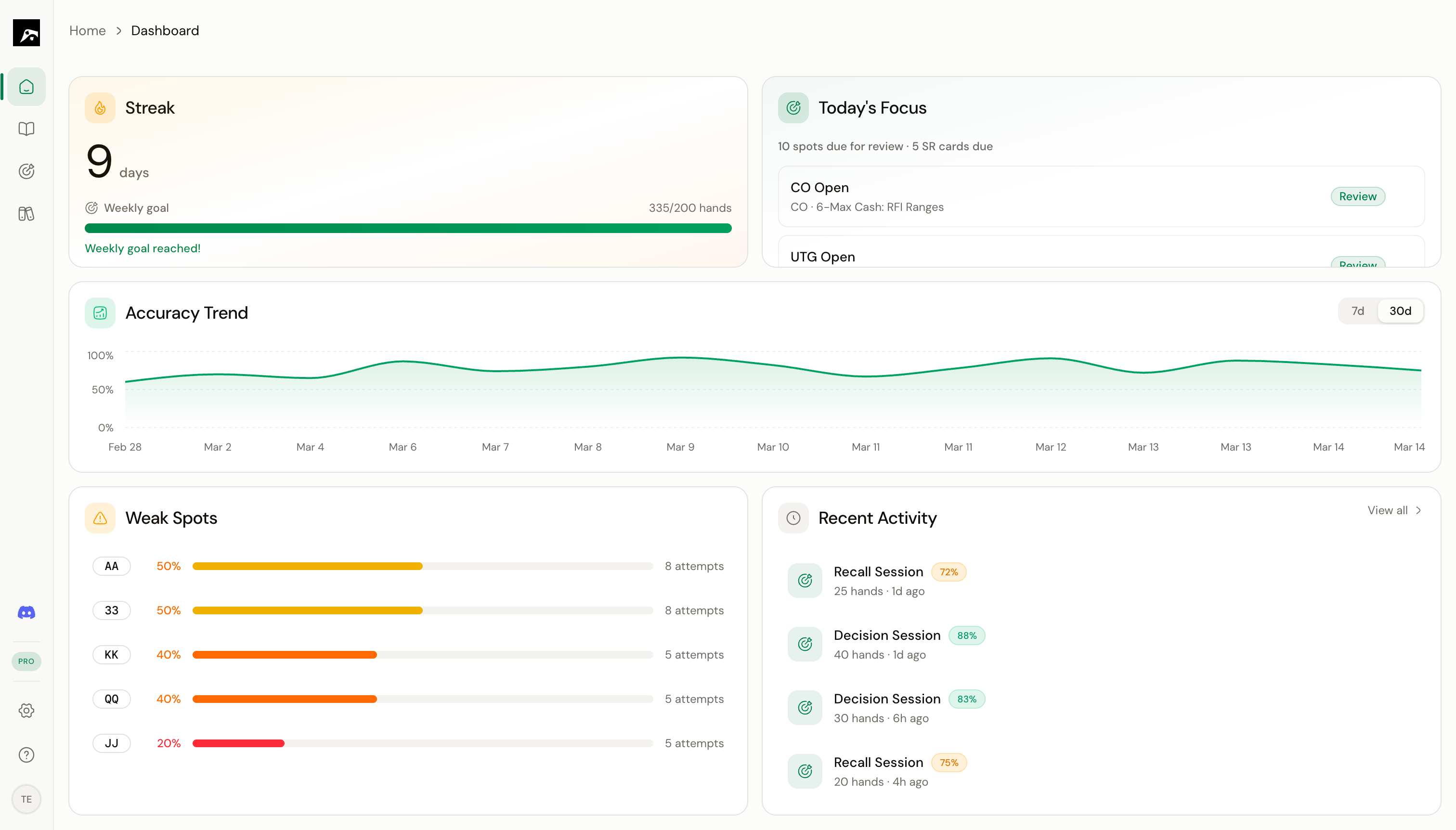 The Home dashboard is the first thing you see when you open RangeSharp. It gives you a quick overview of your study progress and tells you what to focus on today.
## Dashboard widgets
The dashboard is built from five widgets:
Shows your current training streak and weekly study progress. How many consecutive days have you trained?
A 7-day rolling chart of your training accuracy. See whether you're improving, plateauing, or declining.
Lists the spots where your accuracy is lowest. These are the areas that need the most attention.
AI-recommended spots plus spaced repetition cards that are due for review today.
Your most recent training sessions with quick stats.
## Using the dashboard effectively
The dashboard is designed to answer one question: **"What should I study right now?"**
Here's a suggested daily routine:
See if you've maintained your daily streak. This is a simple motivator to keep training.
The recommended spots are based on your spaced repetition schedule and recent performance. Start your session here.
If you have time after completing Today's Focus, work on the spots where your accuracy is lowest.
Are you improving overall? If your accuracy is flat or declining, consider slowing down and focusing on fewer spots.
## Dashboard data
All dashboard data updates automatically after each training session. You don't need to do anything to keep it current — just train and the dashboard reflects your progress.
The Home dashboard is the first thing you see when you open RangeSharp. It gives you a quick overview of your study progress and tells you what to focus on today.
## Dashboard widgets
The dashboard is built from five widgets:
Shows your current training streak and weekly study progress. How many consecutive days have you trained?
A 7-day rolling chart of your training accuracy. See whether you're improving, plateauing, or declining.
Lists the spots where your accuracy is lowest. These are the areas that need the most attention.
AI-recommended spots plus spaced repetition cards that are due for review today.
Your most recent training sessions with quick stats.
## Using the dashboard effectively
The dashboard is designed to answer one question: **"What should I study right now?"**
Here's a suggested daily routine:
See if you've maintained your daily streak. This is a simple motivator to keep training.
The recommended spots are based on your spaced repetition schedule and recent performance. Start your session here.
If you have time after completing Today's Focus, work on the spots where your accuracy is lowest.
Are you improving overall? If your accuracy is flat or declining, consider slowing down and focusing on fewer spots.
## Dashboard data
All dashboard data updates automatically after each training session. You don't need to do anything to keep it current — just train and the dashboard reflects your progress.