> ## Documentation Index
> Fetch the complete documentation index at: https://docs.rangesharp.com/llms.txt
> Use this file to discover all available pages before exploring further.
# Browsing the Library
> How to explore the GTO Library and find strategies to add to your collection.
## What is the GTO Library?
The GTO Library is a collection of pre-built range strategies from professional solver sources. Instead of building every range from scratch or importing solver files yourself, you can browse the Library and add ready-made strategies to your account with one click.
## Accessing the Library
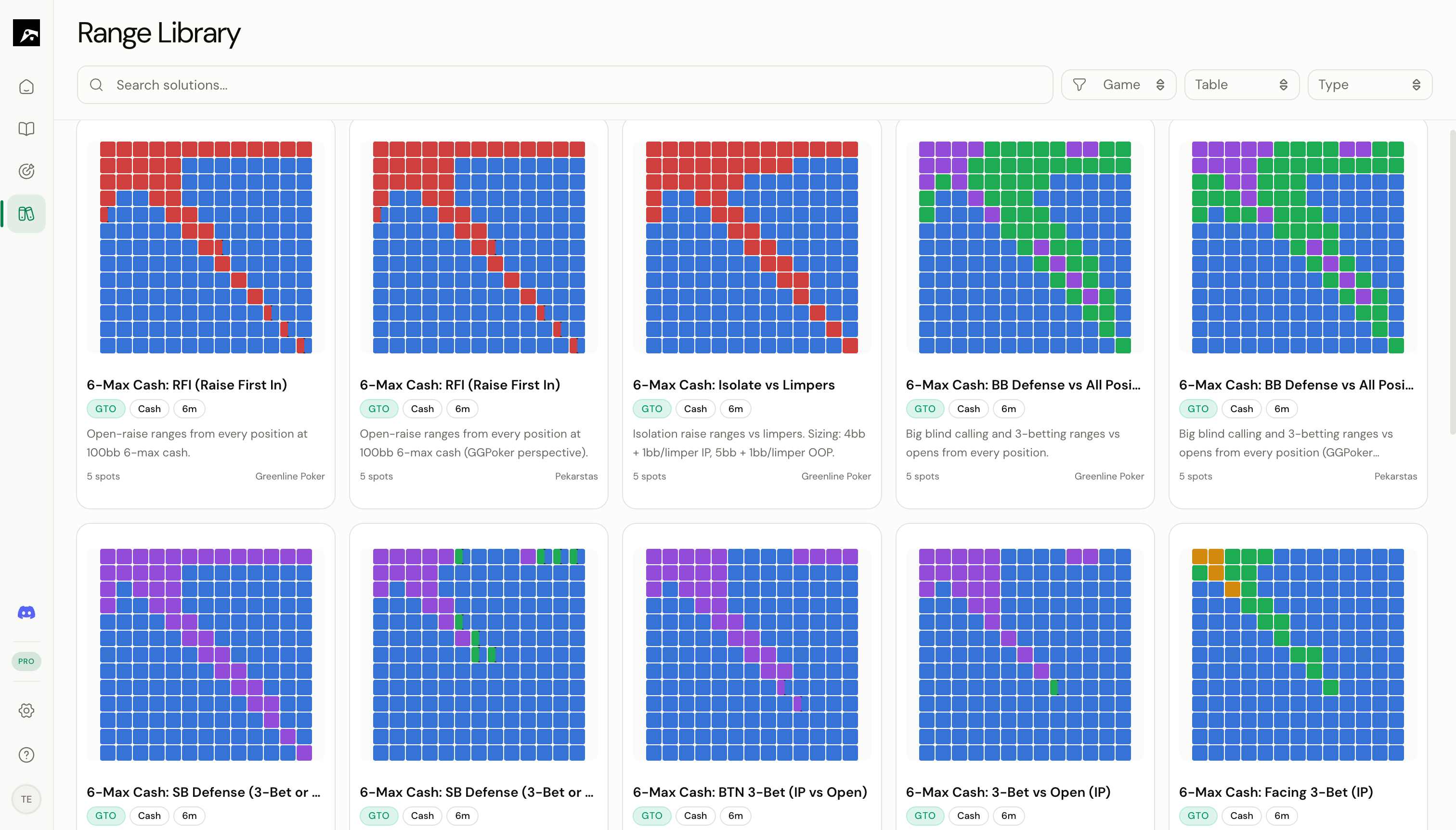 Click **Library** in the nav rail to open the Library browser.
## What's in the Library?
The Library contains three types of solutions:
| Type | Description | Plan |
| -------------------- | -------------------------------------------------------------------- | ---- |
| **Simplified GTO** | Solver ranges rounded to 25% frequency steps for easier memorization | All |
| **GTO (raw)** | Full solver output with exact frequencies and EV data | Pro+ |
| **Custom / Exploit** | Strategy packages from coaches and advanced players | Pro+ |
## Browsing strategies
Each strategy in the Library is displayed as a **card** showing:
* Strategy name
* Game format (Cash, MTT, Spin & Go)
* Table size
* Source (solver or author)
* Mini grid thumbnails showing sample ranges
Click on a card to see a **full preview** with:
* All spots included in the strategy
* A preview of the range grid for each spot
* Description and source information
## Virtual scrolling
The Library can contain hundreds of strategies. RangeSharp uses virtual scrolling to load them efficiently — you can scroll through the entire collection without performance issues.
## Next steps
Narrow down the Library to find exactly what you need.
Copy a Library strategy to your account.
Click **Library** in the nav rail to open the Library browser.
## What's in the Library?
The Library contains three types of solutions:
| Type | Description | Plan |
| -------------------- | -------------------------------------------------------------------- | ---- |
| **Simplified GTO** | Solver ranges rounded to 25% frequency steps for easier memorization | All |
| **GTO (raw)** | Full solver output with exact frequencies and EV data | Pro+ |
| **Custom / Exploit** | Strategy packages from coaches and advanced players | Pro+ |
## Browsing strategies
Each strategy in the Library is displayed as a **card** showing:
* Strategy name
* Game format (Cash, MTT, Spin & Go)
* Table size
* Source (solver or author)
* Mini grid thumbnails showing sample ranges
Click on a card to see a **full preview** with:
* All spots included in the strategy
* A preview of the range grid for each spot
* Description and source information
## Virtual scrolling
The Library can contain hundreds of strategies. RangeSharp uses virtual scrolling to load them efficiently — you can scroll through the entire collection without performance issues.
## Next steps
Narrow down the Library to find exactly what you need.
Copy a Library strategy to your account.