> ## Documentation Index
> Fetch the complete documentation index at: https://docs.rangesharp.com/llms.txt
> Use this file to discover all available pages before exploring further.
# Decision Mode
> Practice making preflop decisions one hand at a time.
## What is Decision mode?
Decision mode is the primary training mode in RangeSharp. It simulates the experience of playing poker by dealing you random hands and asking you to choose the correct action based on your range.
## Starting a Decision mode session
### Quick train from Study
1. Open a spot in the Study workspace.
2. Press **⌘T** or click **Train** in the toolbar.
3. A Decision mode session starts on that spot.
### From a study plan
1. Go to **Train** in the nav rail.
2. Select a study plan.
3. Make sure the mode is set to **Decision**.
4. Click **Start**.
## How a session works
 ### The poker table view
Each hand is presented on a visual poker table showing:
* **Your seat** highlighted at the table
* **Position badges** on each seat (UTG, MP, CO, BTN, SB, BB)
* **Your hole cards** displayed clearly
* **The action context** — what happened before your decision (e.g., "UTG folds, MP raises to 2.5bb")
### Answering a hand
Below the table, you see action buttons for each possible action (Raise, Call, Fold, etc.). Each button matches the action colors from your range.
**To answer:**
* Click the action button, **or**
* Press the number key (**1**, **2**, **3**, **4**) corresponding to the action
### Feedback
After each answer, RangeSharp tells you immediately:
* **Correct** — The cell briefly flashes green. If auto-advance is on, the next hand appears automatically.
* **Wrong** — The cell flashes red, and the correct action is shown. You see which action the hand actually belongs to in your range.
### Advancing
* Press **Space** to go to the next hand
* Or enable **auto-advance** in your training preferences to skip this step
### Ending the session
Press **Esc** at any time to end the session and see your results.
## Session summary
### The poker table view
Each hand is presented on a visual poker table showing:
* **Your seat** highlighted at the table
* **Position badges** on each seat (UTG, MP, CO, BTN, SB, BB)
* **Your hole cards** displayed clearly
* **The action context** — what happened before your decision (e.g., "UTG folds, MP raises to 2.5bb")
### Answering a hand
Below the table, you see action buttons for each possible action (Raise, Call, Fold, etc.). Each button matches the action colors from your range.
**To answer:**
* Click the action button, **or**
* Press the number key (**1**, **2**, **3**, **4**) corresponding to the action
### Feedback
After each answer, RangeSharp tells you immediately:
* **Correct** — The cell briefly flashes green. If auto-advance is on, the next hand appears automatically.
* **Wrong** — The cell flashes red, and the correct action is shown. You see which action the hand actually belongs to in your range.
### Advancing
* Press **Space** to go to the next hand
* Or enable **auto-advance** in your training preferences to skip this step
### Ending the session
Press **Esc** at any time to end the session and see your results.
## Session summary
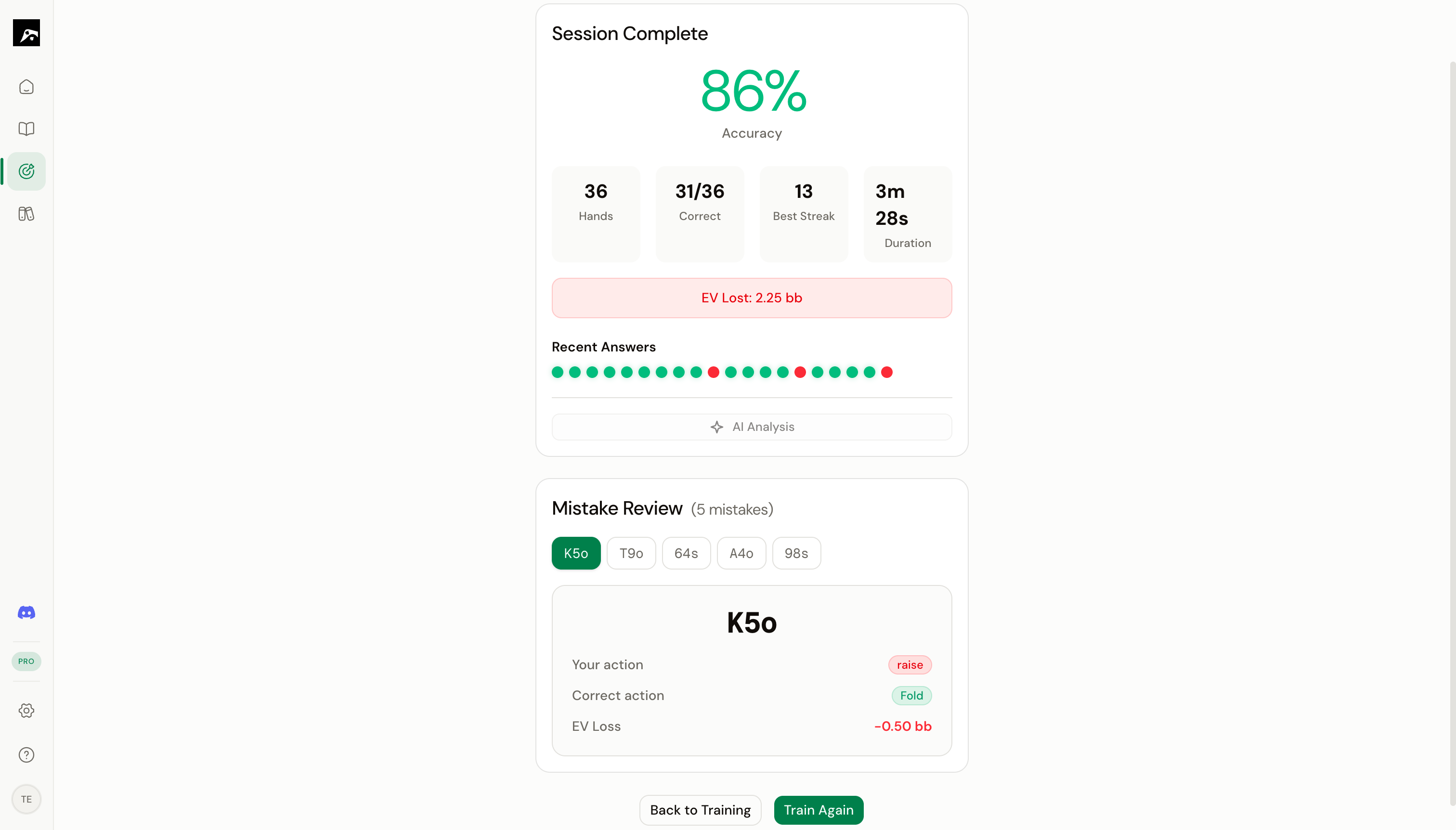 At the end of a session, you see:
| Stat | Description |
| ------------------ | ------------------------------------------------------------------ |
| **Accuracy** | Percentage of hands answered correctly |
| **Hands played** | Total number of hands in the session |
| **Longest streak** | Most consecutive correct answers |
| **EV lost** | Estimated EV loss from incorrect answers (if EV data is available) |
## Tips for Decision mode training
**Start with 20–30 hands per session.** Short, focused sessions are more effective for learning than marathon sessions. Your brain retains more when you train in bursts.
* **Focus on one spot at a time** when learning a new range. Use quick train from the Study workspace.
* **Use study plans** once you're comfortable with individual spots. Training across multiple spots in one session builds context-switching skills.
* **Pay attention to the hands you miss.** If you consistently get the same hands wrong, add a note to the spot reminding yourself about those edge cases.
* **Train daily.** Even 10–15 minutes of Decision mode per day, combined with spaced repetition, will meaningfully improve your game.
At the end of a session, you see:
| Stat | Description |
| ------------------ | ------------------------------------------------------------------ |
| **Accuracy** | Percentage of hands answered correctly |
| **Hands played** | Total number of hands in the session |
| **Longest streak** | Most consecutive correct answers |
| **EV lost** | Estimated EV loss from incorrect answers (if EV data is available) |
## Tips for Decision mode training
**Start with 20–30 hands per session.** Short, focused sessions are more effective for learning than marathon sessions. Your brain retains more when you train in bursts.
* **Focus on one spot at a time** when learning a new range. Use quick train from the Study workspace.
* **Use study plans** once you're comfortable with individual spots. Training across multiple spots in one session builds context-switching skills.
* **Pay attention to the hands you miss.** If you consistently get the same hands wrong, add a note to the spot reminding yourself about those edge cases.
* **Train daily.** Even 10–15 minutes of Decision mode per day, combined with spaced repetition, will meaningfully improve your game.