> ## Documentation Index
> Fetch the complete documentation index at: https://docs.rangesharp.com/llms.txt
> Use this file to discover all available pages before exploring further.
# Training Overview
> How training works in RangeSharp and how to get the most out of it.
## How training works
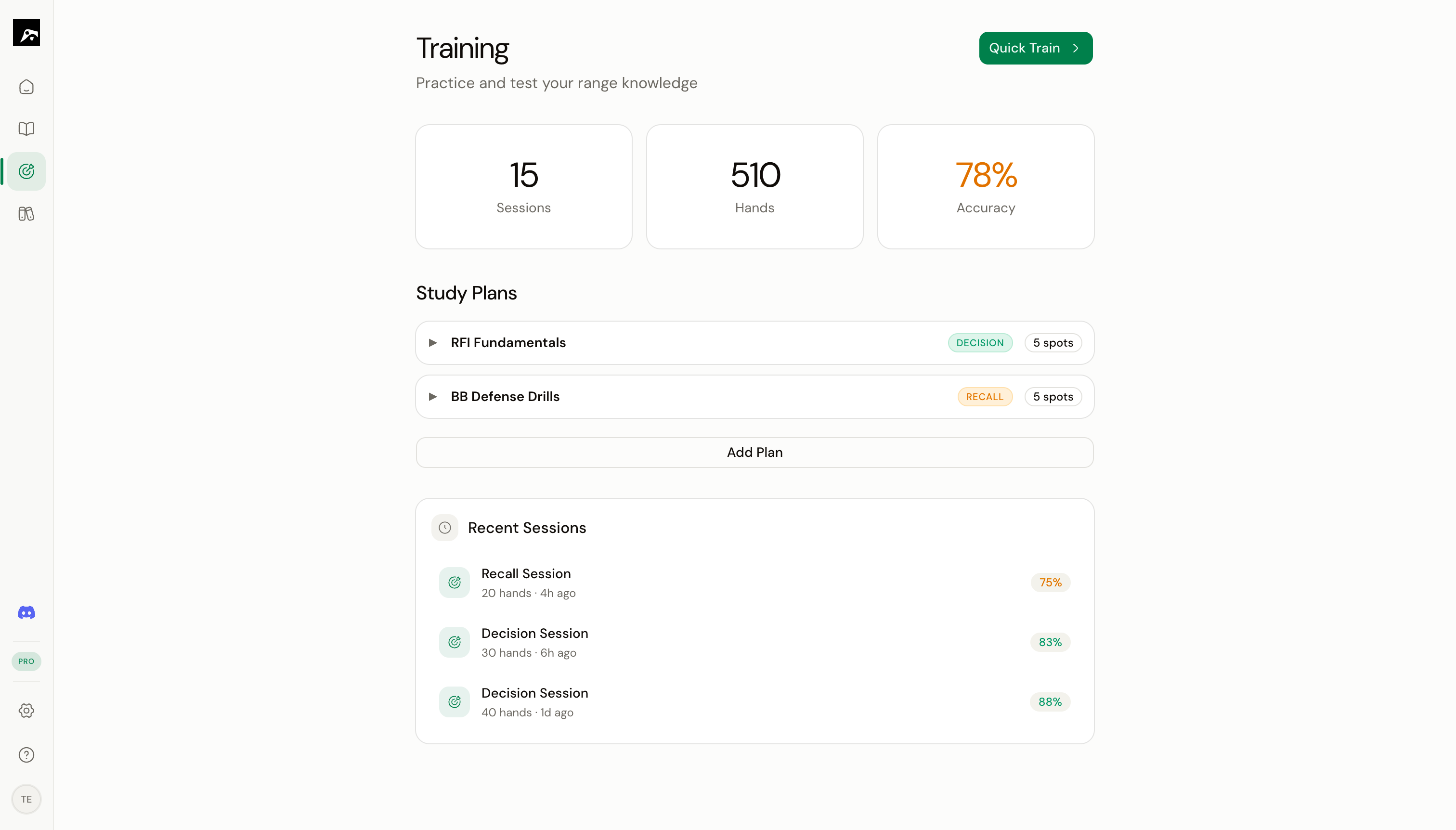 Training in RangeSharp tests your knowledge of the ranges you've built or imported. You practice making decisions on random hands, and RangeSharp tracks your accuracy, identifies patterns in your mistakes, and schedules reviews using spaced repetition.
## Two training modes
| Mode | What you do | What it tests |
| --------------------------------------- | ---------------------------------- | ------------------------------------ |
| [**Decision**](/training/decision-mode) | See a hand, choose an action | Real-time decision-making speed |
| [**Recall**](/training/recall-mode) | Reproduce a full range from memory | Deep knowledge of the complete range |
Most players should focus on Decision mode for daily practice and use Recall mode to verify mastery.
## Two ways to start training
### Quick train
Press **⌘T** (or click the **Train** button in the toolbar) while viewing any spot in the Study workspace. This immediately starts a Decision mode session on that single spot.
### Study plan
Open the **Train** section from the nav rail, select a study plan, and click **Start**. This runs a session across all the spots in the plan, with spaced repetition determining which spots appear first.
## During a session
Every training session includes:
1. **Hand presentation** — You see a poker table with your position, the action context, and your hole cards
2. **Your answer** — Pick the correct action or paint the range
3. **Feedback** — Immediate right/wrong feedback with the correct answer shown
4. **Progress tracking** — Accuracy percentage and streak count update in real time
## After a session
When you end a session (press **Esc** or complete the plan), RangeSharp shows:
* **Session summary** — Accuracy, hands played, EV lost, longest streak
* **Mistake list** — Every hand you got wrong, with the correct action
* **Review option** — Step through your mistakes one by one to study them
The session data feeds into your spaced repetition cards and mastery levels.
## Training features at a glance
Deal-and-choose practice
Reproduce ranges from memory
Organize spots into training plans
Optimized review scheduling
Random number generator for frequency-based answers
Step through errors after a session
AI-powered analysis of your session performance
## Training limits by plan
| Feature | Free | Pro | Elite |
| ------------------------ | ---- | --------- | --------- |
| Training hands/day | 100 | Unlimited | Unlimited |
| Training modes | Both | Both | Both |
| RNG for mixed strategies | No | Yes | Yes |
| AI debriefs/day | 1 | 10 | 30 |
Training in RangeSharp tests your knowledge of the ranges you've built or imported. You practice making decisions on random hands, and RangeSharp tracks your accuracy, identifies patterns in your mistakes, and schedules reviews using spaced repetition.
## Two training modes
| Mode | What you do | What it tests |
| --------------------------------------- | ---------------------------------- | ------------------------------------ |
| [**Decision**](/training/decision-mode) | See a hand, choose an action | Real-time decision-making speed |
| [**Recall**](/training/recall-mode) | Reproduce a full range from memory | Deep knowledge of the complete range |
Most players should focus on Decision mode for daily practice and use Recall mode to verify mastery.
## Two ways to start training
### Quick train
Press **⌘T** (or click the **Train** button in the toolbar) while viewing any spot in the Study workspace. This immediately starts a Decision mode session on that single spot.
### Study plan
Open the **Train** section from the nav rail, select a study plan, and click **Start**. This runs a session across all the spots in the plan, with spaced repetition determining which spots appear first.
## During a session
Every training session includes:
1. **Hand presentation** — You see a poker table with your position, the action context, and your hole cards
2. **Your answer** — Pick the correct action or paint the range
3. **Feedback** — Immediate right/wrong feedback with the correct answer shown
4. **Progress tracking** — Accuracy percentage and streak count update in real time
## After a session
When you end a session (press **Esc** or complete the plan), RangeSharp shows:
* **Session summary** — Accuracy, hands played, EV lost, longest streak
* **Mistake list** — Every hand you got wrong, with the correct action
* **Review option** — Step through your mistakes one by one to study them
The session data feeds into your spaced repetition cards and mastery levels.
## Training features at a glance
Deal-and-choose practice
Reproduce ranges from memory
Organize spots into training plans
Optimized review scheduling
Random number generator for frequency-based answers
Step through errors after a session
AI-powered analysis of your session performance
## Training limits by plan
| Feature | Free | Pro | Elite |
| ------------------------ | ---- | --------- | --------- |
| Training hands/day | 100 | Unlimited | Unlimited |
| Training modes | Both | Both | Both |
| RNG for mixed strategies | No | Yes | Yes |
| AI debriefs/day | 1 | 10 | 30 |