> ## Documentation Index
> Fetch the complete documentation index at: https://docs.rangesharp.com/llms.txt
> Use this file to discover all available pages before exploring further.
# Reviewing Mistakes
> How to review errors after a training session and learn from them.
## Why review mistakes?
Training is most effective when you spend time studying the hands you got wrong. The mistake review feature lets you step through every error from your session, see the correct answer, and understand why you were wrong.
## Accessing mistake review
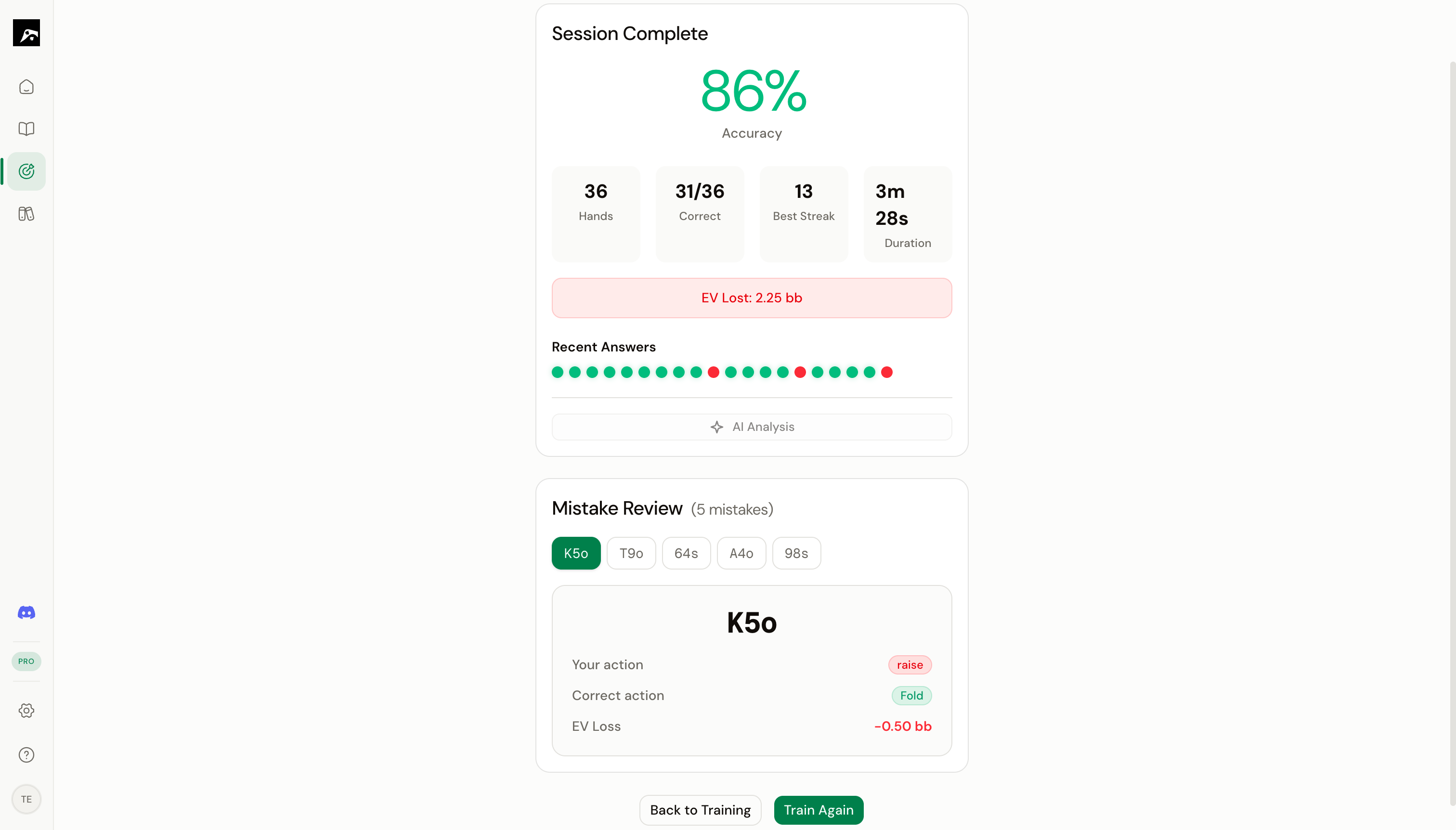 After ending a training session, the session summary shows a **Mistakes** section listing every hand you answered incorrectly.
Click **Review Mistakes** to enter the review mode.
## How mistake review works
The mistake review shows you the hand, the spot context (position, action line), and the action you chose.
The correct action is displayed alongside the range grid. The cell for the hand in question is highlighted so you can see where it sits in the overall range.
Look at the cells around the missed hand. This helps you understand the range boundary — which hands are in and which are out.
Click **Next** or press **Space** to advance to the next mistake in the list.
## What to look for during review
| Pattern | What it means | What to do |
| ------------------------------------------------------------- | ------------------------------------------------------ | --------------------------------------------------------- |
| You always miss the same hand class (e.g., suited connectors) | You may not have memorized that part of the range | Focus your next session on that area of the grid |
| You confuse raise vs. call on borderline hands | The range boundary is fuzzy in your memory | Study the boundary hands specifically, and add a note |
| You miss mixed-strategy hands | You're treating mixed hands as pure raise or pure call | Enable RNG training and practice the frequency thresholds |
| You miss hands in one position but not others | Positional adjustment is the weak link | Create a study plan focused on that position |
## Session history
Your training history is saved so you can review past sessions anytime:
1. Go to the **Home** dashboard.
2. Look at the **Recent Activity** section.
3. Click on a past session to see its summary and mistake list.
## Tips
**Don't skip the review.** Spending 2–3 minutes reviewing mistakes after each session is one of the highest-value study habits. It turns your errors into deliberate learning opportunities.
* After reviewing, go back to the Study workspace and look at the range with fresh eyes. The hands you missed will stand out now.
* If you keep missing the same hands across sessions, add notes to the spot explaining the correct reasoning.
* Use the heatmap overlay in the Study workspace to visualize which hands you train correctly and which ones give you trouble.
After ending a training session, the session summary shows a **Mistakes** section listing every hand you answered incorrectly.
Click **Review Mistakes** to enter the review mode.
## How mistake review works
The mistake review shows you the hand, the spot context (position, action line), and the action you chose.
The correct action is displayed alongside the range grid. The cell for the hand in question is highlighted so you can see where it sits in the overall range.
Look at the cells around the missed hand. This helps you understand the range boundary — which hands are in and which are out.
Click **Next** or press **Space** to advance to the next mistake in the list.
## What to look for during review
| Pattern | What it means | What to do |
| ------------------------------------------------------------- | ------------------------------------------------------ | --------------------------------------------------------- |
| You always miss the same hand class (e.g., suited connectors) | You may not have memorized that part of the range | Focus your next session on that area of the grid |
| You confuse raise vs. call on borderline hands | The range boundary is fuzzy in your memory | Study the boundary hands specifically, and add a note |
| You miss mixed-strategy hands | You're treating mixed hands as pure raise or pure call | Enable RNG training and practice the frequency thresholds |
| You miss hands in one position but not others | Positional adjustment is the weak link | Create a study plan focused on that position |
## Session history
Your training history is saved so you can review past sessions anytime:
1. Go to the **Home** dashboard.
2. Look at the **Recent Activity** section.
3. Click on a past session to see its summary and mistake list.
## Tips
**Don't skip the review.** Spending 2–3 minutes reviewing mistakes after each session is one of the highest-value study habits. It turns your errors into deliberate learning opportunities.
* After reviewing, go back to the Study workspace and look at the range with fresh eyes. The hands you missed will stand out now.
* If you keep missing the same hands across sessions, add notes to the spot explaining the correct reasoning.
* Use the heatmap overlay in the Study workspace to visualize which hands you train correctly and which ones give you trouble.