What is a range?

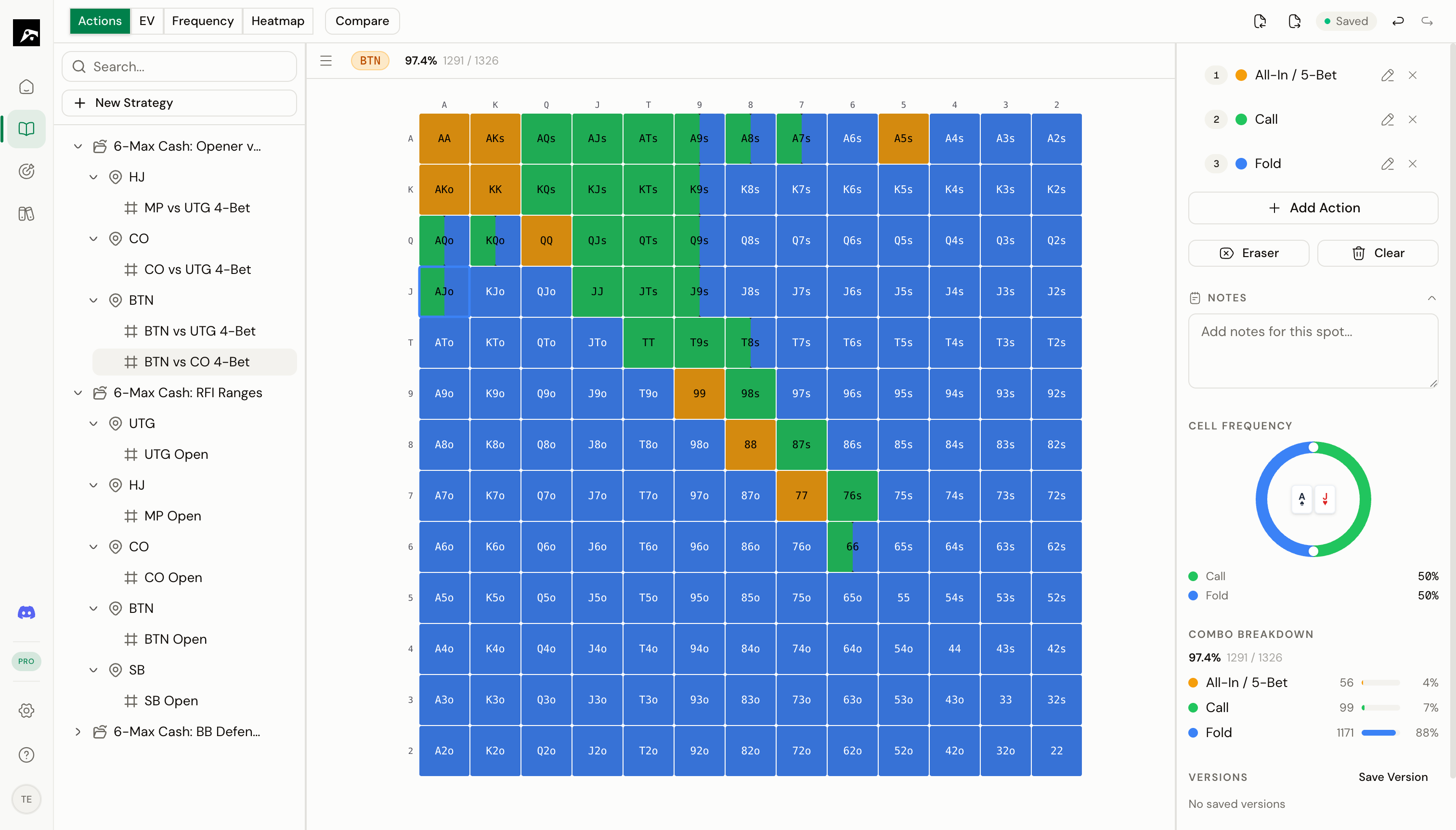
A range displayed on the 13×13 grid with color-coded actions, frequency ring, and combo breakdown
A range is the set of hands you would play in a specific spot, displayed on a 13×13 grid. The grid represents all 169 unique starting hand combinations in Texas Hold’em. The grid is arranged with:
  • Pairs along the diagonal (AA in the top-left, 22 in the bottom-right)
  • Suited hands above the diagonal (AKs, AQs, etc.)
  • Offsuit hands below the diagonal (AKo, AQo, etc.)

Actions and colors

Each hand in a range is assigned an action — what you do with that hand in this situation. Actions are represented by colors on the grid. Common actions include:
ActionTypical colorMeaning
Raise / OpenGreen or RedYou raise or open the pot
CallBlueYou call the previous bet
FoldEmpty (no color)You fold this hand
3-BetRed or OrangeYou re-raise
All-InYellowYou go all-in
You can name and color your actions however you want. The color picker lets you choose any color, and you can rename actions to match your study system.

Mixed actions (weighted frequencies)

In solver-based play, many hands don’t have a single “correct” action. Instead, they use a mixed strategy — for example, raising 60% of the time and calling 40%. RangeSharp displays mixed actions as split cells. A cell with two colors shows that the hand uses both actions at different frequencies.
Weighted frequencies require a Pro or Elite plan. On the Free plan, each cell can only have one action.

Action colors

Each spot has its own set of action colors. You can:
  • Add new actions (up to 2 on Free, up to 40 on Pro/Elite)
  • Rename actions (e.g., change “Action 1” to “Open Raise”)
  • Change the color of any action
  • Set default colors in your preferences so new spots start with your preferred setup

Combo count

Below the grid, RangeSharp shows the combo summary for the active action:
Raise: 24.5% · 325/1326 combos
This tells you:
  • What percentage of all possible starting hands use this action
  • The exact number of combos (out of 1326 total)
This is important for checking that your ranges are the right size. A typical UTG open range in 6-max is around 15–18% of hands.

The 13×13 grid at a glance

     A    K    Q    J    T    9    8    7    6    5    4    3    2
A   AA   AKs  AQs  AJs  ATs  A9s  A8s  A7s  A6s  A5s  A4s  A3s  A2s
K   AKo  KK   KQs  KJs  KTs  K9s  K8s  K7s  K6s  K5s  K4s  K3s  K2s
Q   AQo  KQo  QQ   QJs  QTs  Q9s  Q8s  Q7s  Q6s  Q5s  Q4s  Q3s  Q2s
J   AJo  KJo  QJo  JJ   JTs  J9s  J8s  J7s  J6s  J5s  J4s  J3s  J2s
T   ATo  KTo  QTo  JTo  TT   T9s  T8s  T7s  T6s  T5s  T4s  T3s  T2s
9   A9o  K9o  Q9o  J9o  T9o  99   98s  97s  96s  95s  94s  93s  92s
8   A8o  K8o  Q8o  J8o  T8o  98o  88   87s  86s  85s  84s  83s  82s
7   A7o  K7o  Q7o  J7o  T7o  97o  87o  77   76s  75s  74s  73s  72s
6   A6o  K6o  Q6o  J6o  T6o  96o  86o  76o  66   65s  64s  63s  62s
5   A5o  K5o  Q5o  J5o  T5o  95o  85o  75o  65o  55   54s  53s  52s
4   A4o  K4o  Q4o  J4o  T4o  94o  84o  74o  64o  54o  44   43s  42s
3   A3o  K3o  Q3o  J3o  T3o  93o  83o  73o  63o  53o  43o  33   32s
2   A2o  K2o  Q2o  J2o  T2o  92o  82o  72o  62o  52o  42o  32o  22
Each cell in the grid corresponds to one hand combination (e.g., AKs = Ace-King suited). You paint cells with action colors to build your range for a given spot.