What is Decision mode?
Decision mode is the primary training mode in RangeSharp. It simulates the experience of playing poker by dealing you random hands and asking you to choose the correct action based on your range.
Starting a Decision mode session
Quick train from Study
- Open a spot in the Study workspace.
- Press ⌘T or click Train in the toolbar.
- A Decision mode session starts on that spot.
From a study plan
- Go to Train in the nav rail.
- Select a study plan.
- Make sure the mode is set to Decision.
- Click Start.
How a session works
The poker table view
Each hand is presented on a visual poker table showing:
- Your seat highlighted at the table
- Position badges on each seat (UTG, MP, CO, BTN, SB, BB)
- Your hole cards displayed clearly
- The action context — what happened before your decision (e.g., “UTG folds, MP raises to 2.5bb”)
Answering a hand
Below the table, you see action buttons for each possible action (Raise, Call, Fold, etc.). Each button matches the action colors from your range.
To answer:
- Click the action button, or
- Press the number key (1, 2, 3, 4) corresponding to the action
Feedback
After each answer, RangeSharp tells you immediately:
- Correct — The cell briefly flashes green. If auto-advance is on, the next hand appears automatically.
- Wrong — The cell flashes red, and the correct action is shown. You see which action the hand actually belongs to in your range.
Advancing
- Press Space to go to the next hand
- Or enable auto-advance in your training preferences to skip this step
Ending the session
Press Esc at any time to end the session and see your results.
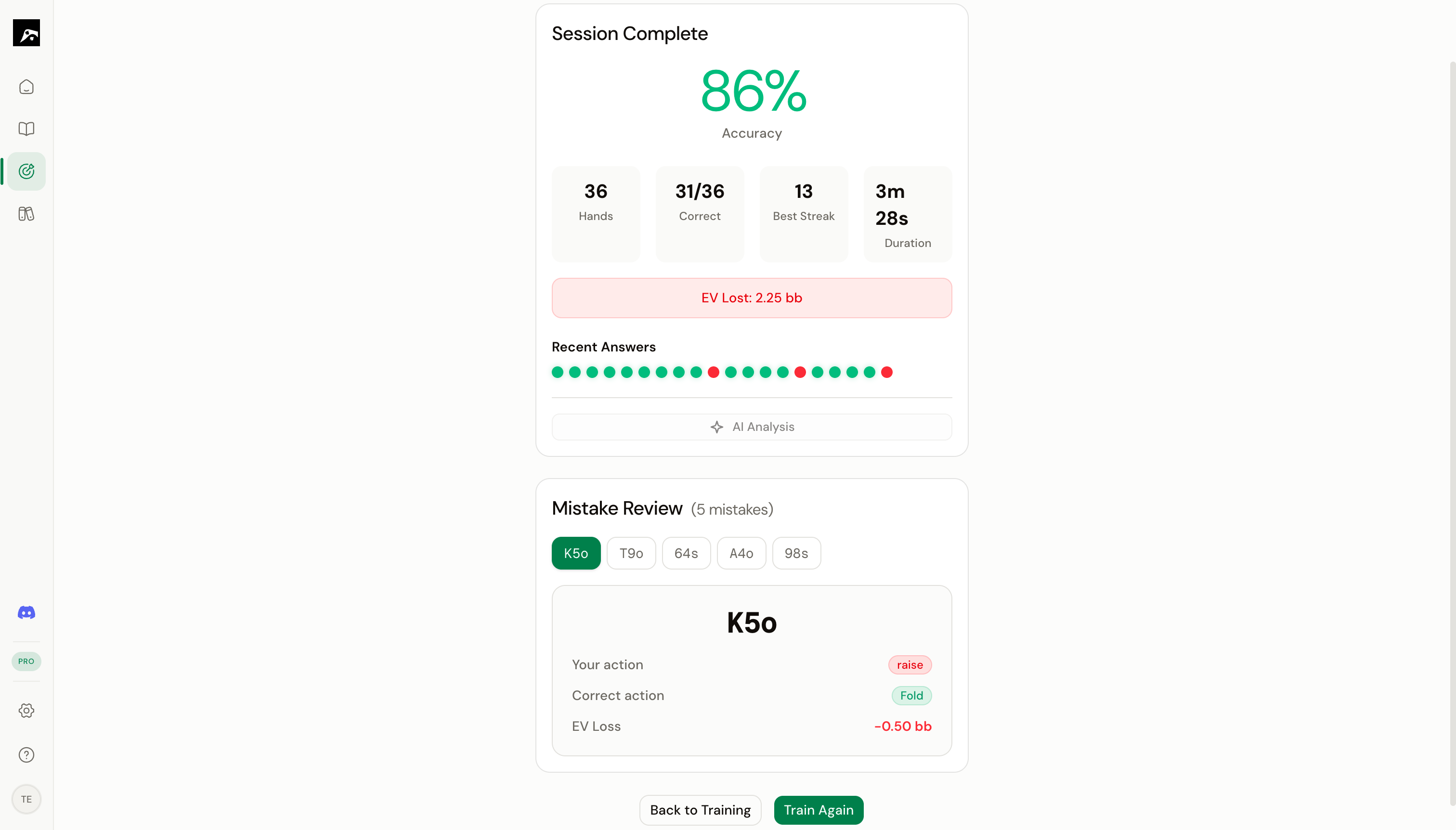
Session summary
At the end of a session, you see:
Tips for Decision mode training
Start with 20–30 hands per session. Short, focused sessions are more effective for learning than marathon sessions. Your brain retains more when you train in bursts.
- Focus on one spot at a time when learning a new range. Use quick train from the Study workspace.
- Use study plans once you’re comfortable with individual spots. Training across multiple spots in one session builds context-switching skills.
- Pay attention to the hands you miss. If you consistently get the same hands wrong, add a note to the spot reminding yourself about those edge cases.
- Train daily. Even 10–15 minutes of Decision mode per day, combined with spaced repetition, will meaningfully improve your game.