
Why review mistakes?
Training is most effective when you spend time studying the hands you got wrong. The mistake review feature lets you step through every error from your session, see the correct answer, and understand why you were wrong.Accessing mistake review
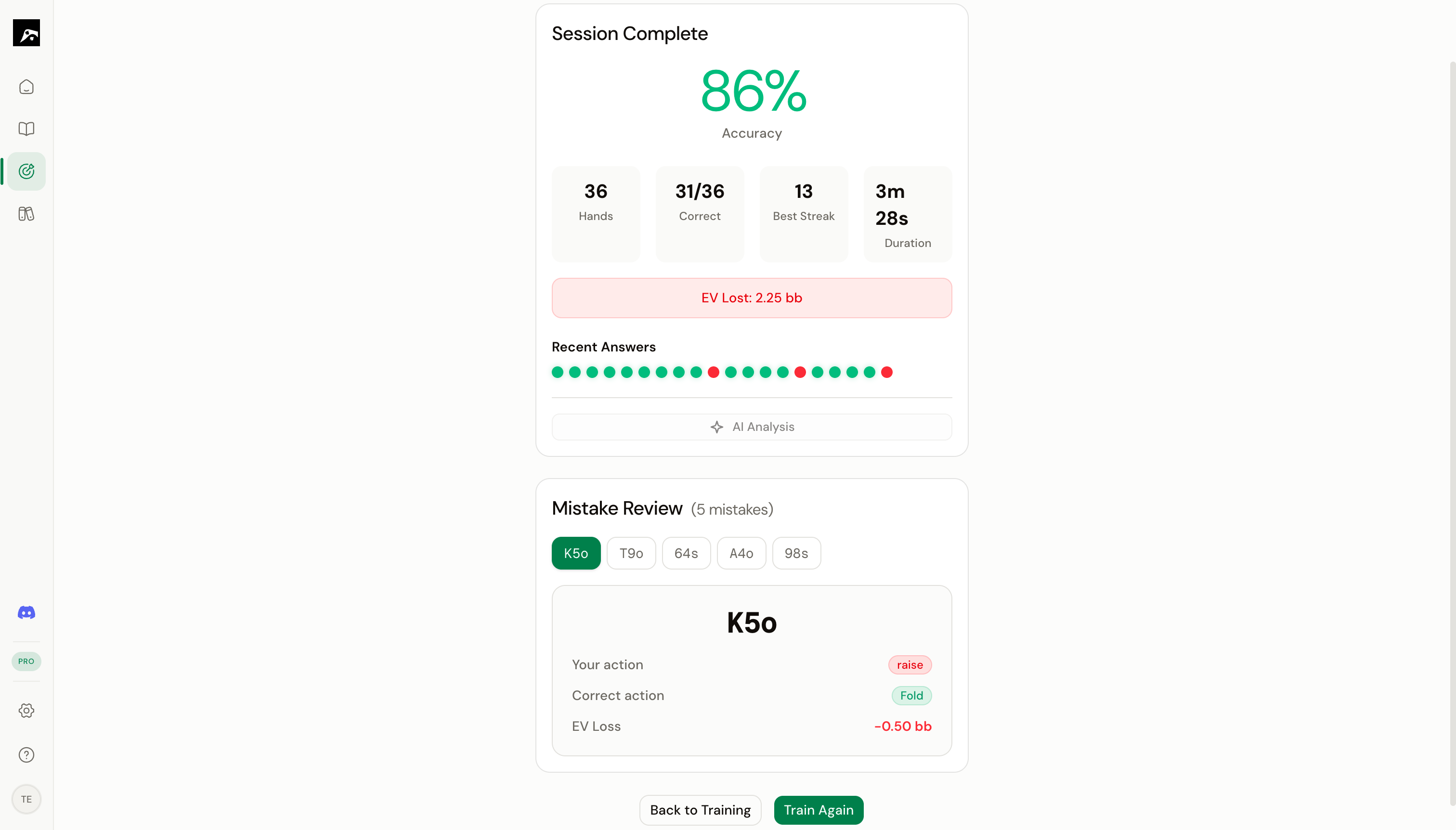
How mistake review works
1
See the hand you missed
The mistake review shows you the hand, the spot context (position, action line), and the action you chose.
2
See the correct action
The correct action is displayed alongside the range grid. The cell for the hand in question is highlighted so you can see where it sits in the overall range.
3
Study the surrounding hands
Look at the cells around the missed hand. This helps you understand the range boundary — which hands are in and which are out.
4
Move to the next mistake
Click Next or press Space to advance to the next mistake in the list.
What to look for during review
Session history
Your training history is saved so you can review past sessions anytime:- Go to the Home dashboard.
- Look at the Recent Activity section.
- Click on a past session to see its summary and mistake list.
Tips
- After reviewing, go back to the Study workspace and look at the range with fresh eyes. The hands you missed will stand out now.
- If you keep missing the same hands across sessions, add notes to the spot explaining the correct reasoning.
- Use the heatmap overlay in the Study workspace to visualize which hands you train correctly and which ones give you trouble.